
Publish message to MQTT
Demo app showing how to publish messages to MQTT from Qlik Sense load script.
Load script
Assuming the .qvs helper subs are used, only one line of script is needed to publish a MQTT message.
The demo app does a bit more. First it posts a startup message to MQTT, then it loads some data and finally an all-done message is sent:
text
// -------------------------------------------
// Publish a MQTT message, load some data and publish another message
Call PostToMQTT('butler/5.0/demo-reloading/status', 'reload started')

// Load some data
Characters:
Load Chr(RecNo()+Ord('A')-1) as Alpha, RecNo() as Num autogenerate 26;

// Publish final message
Call PostToMQTT('butler/5.0/demo-reloading/status', 'reload done')
The MQTT messages look like this in the MQTT Explorer app on macOS:
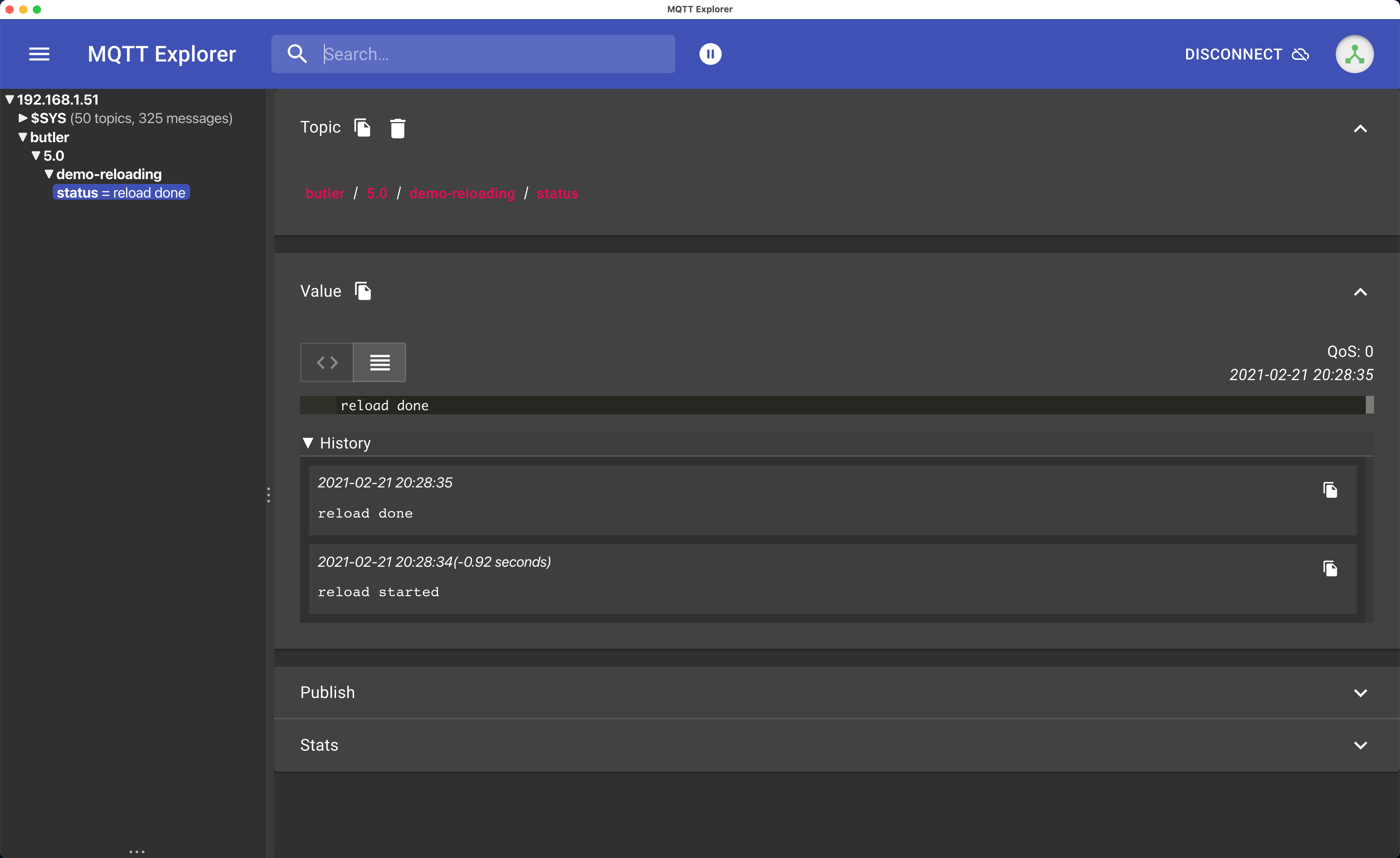
MQTT messages created from Qlik Sense load script
Demo app
The demo app is available in the GitHub repository.
Seeing is believing
The video below is available at Ptarmigan Labs' YouTube channel and also in the Butler playlist.
See Also
- Messaging from Load Script - More examples of Slack and MQTT messaging
- Butler helper functions - Complete reference for all load script helper subs